Organising customer enquiries from WhatsApp: never lose an enquiry again
Monday morning. Three new WhatsApp messages, two missed calls, an email from the website form, an Instagram DM. In between, the family chat and the football club group.
By Wednesday, at least one enquiry is forgotten. And with it, a job.
Why enquiries get lost
- Too many channels: every customer gets in touch however they like. There's no central inbox.
- Private and business chats mixed: an enquiry slips down between two family messages and it's gone.
- No status: has anyone replied? Has the quote gone out? The chat doesn't show it.
- Only one person knows: enquiries go to the boss. If they're on holiday or on site, the customer waits.
The fix: one place for all enquiries
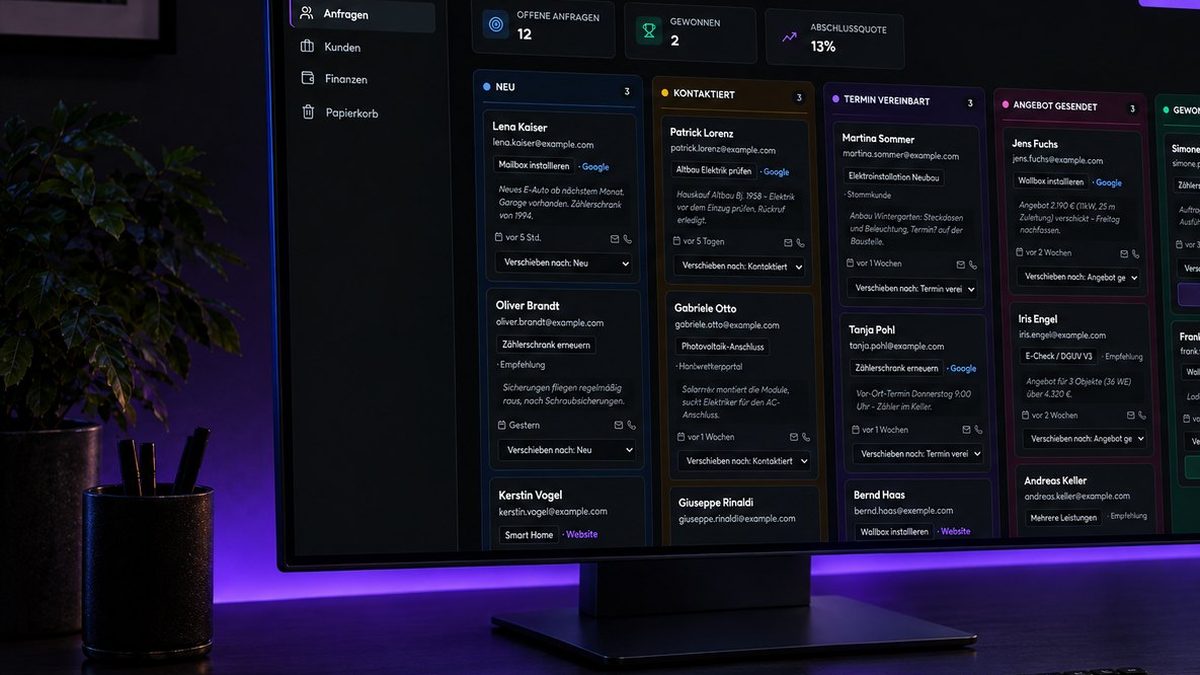
The principle is simple. Every enquiry, wherever it comes from, lands in one place – with a clear status:
- New – just arrived
- Contacted – first reply sent
- Appointment set – visit or consultation booked
- Quote sent – time to follow up
- Won – job confirmed
You see at a glance who's waiting for a reply, which quote needs a follow-up and how many enquiries turn into jobs.
Three rules that help right away
1. Log every enquiry – immediately
When an enquiry comes in via WhatsApp, log it straight away. Name, contact, what it's about, where it came from. It takes thirty seconds.
2. Reply the same day
Many customers ask several businesses. Whoever replies properly first has the best chance. A short "Thanks, we'll get back to you tomorrow with a time" is enough.
3. Follow up on quotes
A quote nobody replies to isn't a no. Often it simply got buried. A friendly follow-up after a week wins a surprising number of jobs.
Less typing: enquiries straight from your website
Even better: enquiries from your website land in the system automatically, no typing. Ouceal's customer management can be extended with an enquiry form on your website – as a fixed-price quote.
What it looks like
Our live demo shows the enquiry pipeline of an electrical business: every enquiry with contact, source (Google, referral, website) and status – movable from column to column. Plus customers, jobs and finances in the same system.
What it costs
- Setup & customisation: from €2,500 one-off – with your logo, your pipeline stages and import of your customer data.
- Hosting, maintenance & backups: from €49 a month – EU servers, support by email and WhatsApp.
No per-user fees. Full details: How much does a CRM cost for a small business?.
Bottom line
WhatsApp is a great channel for talking to customers – but a bad place to manage enquiries. One central inbox with clear status means no enquiry gets lost again. And every enquiry you save can be a job. More about our solution: Customer management.
Frequently asked questions
How do I organise customer enquiries from WhatsApp?
Collect every enquiry – from any channel – in one central place with fixed stages like New, Contacted, Appointment, Quote, Won. That way you instantly see who's waiting for a reply.
Isn't WhatsApp Business enough?
For communication, WhatsApp Business is good. But it shows no process: which enquiry got a quote? Which became a job? For that you need an overview outside the chat.
How fast should I reply to enquiries?
As fast as possible, ideally the same day. Many customers ask several businesses and go with whoever replies properly first.
What does customer management with an enquiry pipeline cost at Ouceal?
From €2,500 one-off plus from €49 a month for hosting, maintenance and backups. No per-user fees.